A simple guide to understanding your hashrate, temperature, power draw, and more.
Herby an easy to read article about you NerdQaxe++ miner screen. Perfect for beginners and relaxing to read on your Sunday.
When you first look at your NerdQaxe++ screen, it can feel like a lot of random information and numbers. But once you understand de basics (what I'm trying to do with my articles), it becomes very easy to read.
We are using this image as a reference:
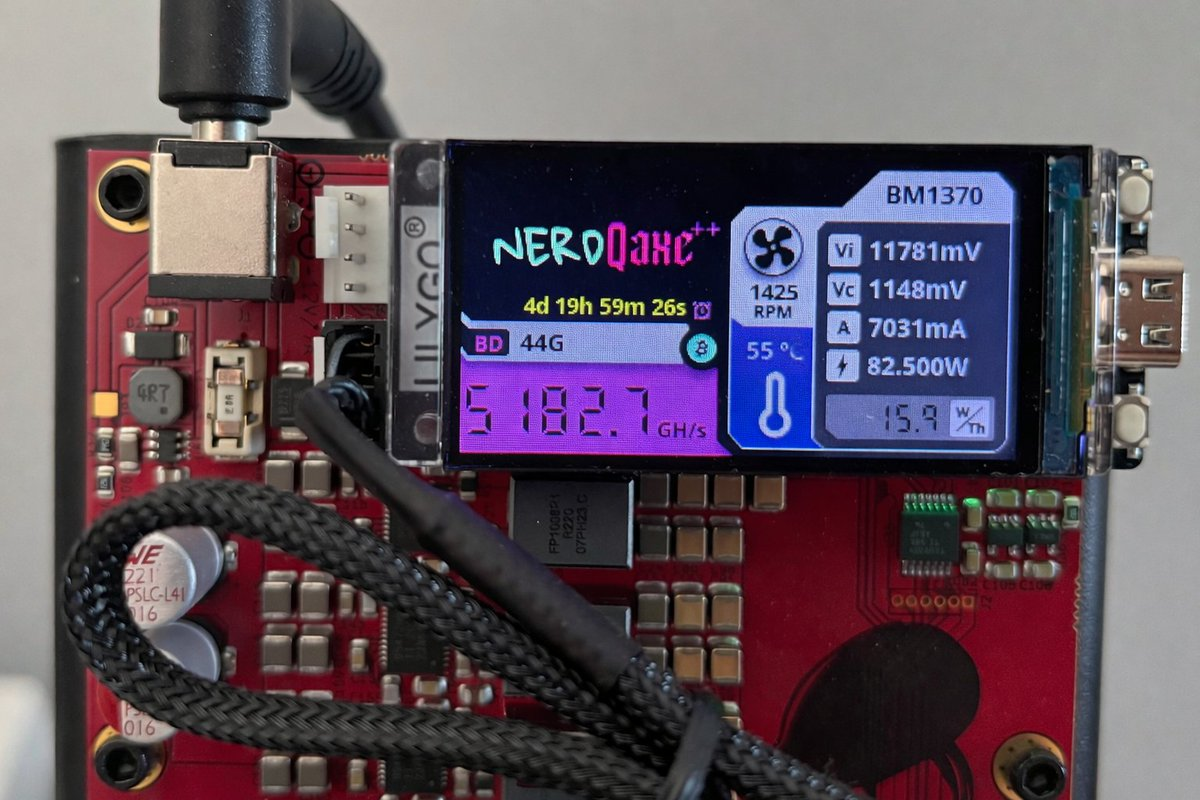
- Hashrate (GH/s) - 5182.7 GH/s
This shows how fast/hard your miner is working.
A higher number means your miner is producing more hashes every second. Which means more chance for a good hash. - BD or Best Diff - 44G
This is your miners best difficulty, or best share.
It shows the strongest hash your miner has found so far. - RPM - 1425
This is just the speed or your fan.
Higher RPM usally means the miner is cooling itself hard. You can set this up yourself. - Temperature - 55°C
This shows how hot your miner is running. It is one of the most important numbers to watch. This should be very stable. If it's to hot, I will shut down. - Vi - 11781mV
This is the input voltage going into the miner.
In my opnion not one to watch daily. But it helps show whether your power supply is delivering stable power. - Vc - 1148mV
Core voltage used by the chip.
It affects stability, performance and power usage. I'm not checking this. - A - 7031mA
Stands for amps. It shows how much current your miner is drawing. - ⚡︎ - 82.500W
This is the total power consumption in watts.
It tells you how much electricity your iner is using right now. Personally I think its important. I'm also connected my miner to a Power meter. So I can calculate the total costs. - W/Th - 15.9
Watts per terahash.
A lower number means your miner is running more efficiently. - Uptime - 4d 19h 59m 26s
This shows your miner's uptime without it having been reset or turned off.
In this case; four days, nineteen hours, fifty-nine minutes and twenty-six seconds. - IP / WiFi - at the top left from BM1370
This shows your network connection details. This is also how you can reach your miner easily. Just put it in the URL.